A New Hugo Theme
| #meta #nix #hugo #colorsOh hi, it’s been a while. What am I doing with this site again?
I don’t have a good answer for that right now. But maybe I’m getting a little closer to knowing.
I was recently reading some articles about the “small web” and it got me thinking about this site again. It inspired me to simplify it by writing my own theme. And of course, I made it all complicated again by bringing nix into another project.
Creating a new theme
I thought that creating a theme would be a huge effort, but I was surprised to find that it wasn’t as hard as I thought it’d be. First off, I’m better at CSS than I realized! It’s probably because of all the time I’ve spent configuring my waybar theme.
But also Hugo gives you a lot of helpful scaffolding when you create a new theme with
hugo new theme my-theme-name
And I was happy to find that Hugo can output the CSS of an existing syntax highlighting theme so I didn’t have to write that from scratch either:
hugo gen chromastyles --style=monokai > syntax.css
Inspiration and Restrictions
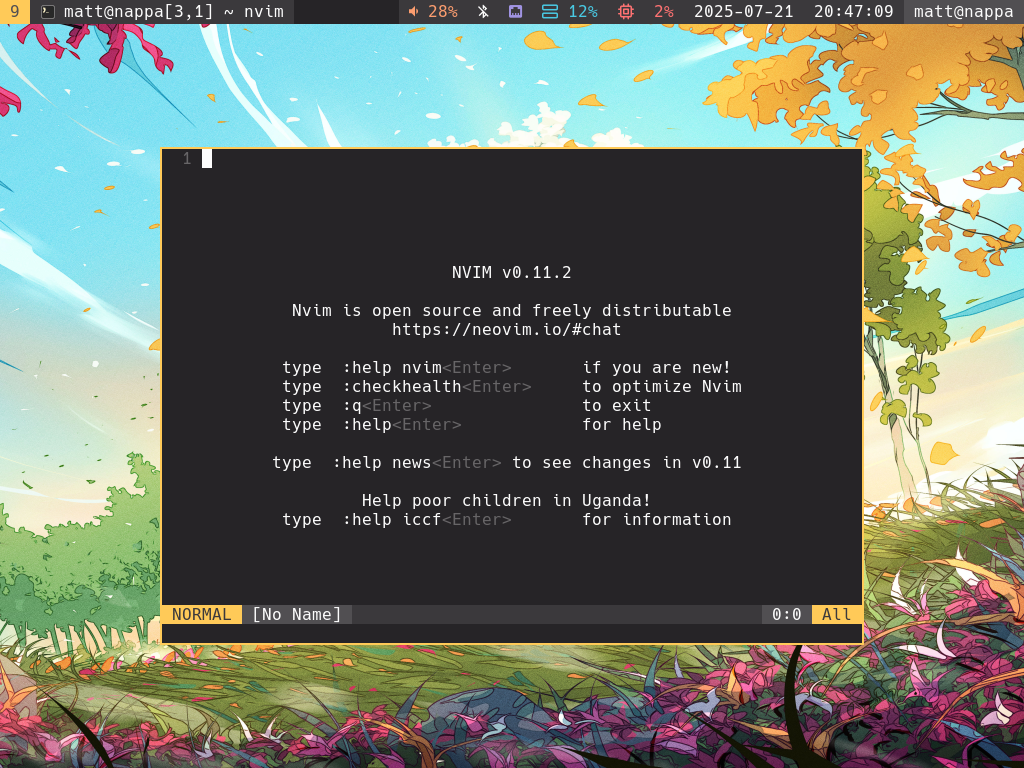
I spend a lot of time working on my dotfiles. So I felt like it was only natural that my website should look similar to my neovim and waybar themes:
 |
|---|
| A floating neovim window in glorious 1024x768 sway with waybar |
That meant that I followed the same guidelines I use for all the themes in my dotfiles:
- Only use 16 colors (from a base16 theme)
- Prefer not to use special characters so it works in a Linux TTY – I don’t mind a few icons in graphical environments like sway or niri though
In a way, I think this was a form of creative limitation. Creating a theme sounds daunting because it’s so open-ended, but with this goal and these restrictions it was so much more attainable. I spent significantly more of my time learning about HTML and CSS than obsessing over the look of it.
Basix for base16 colors
In my dotfiles, I use Basix to expose base16 colorschemes as Nix attribute sets. I brought it into the build process of this site as well.
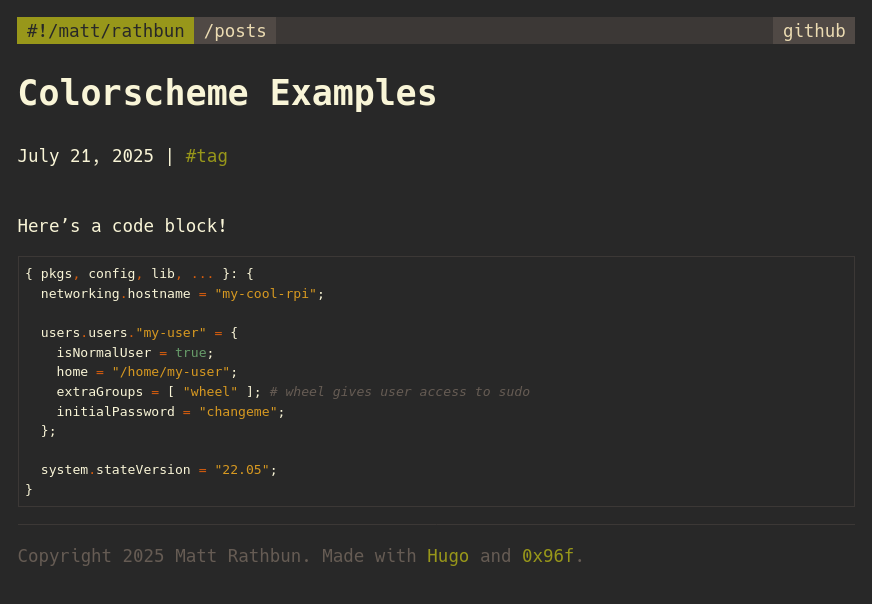
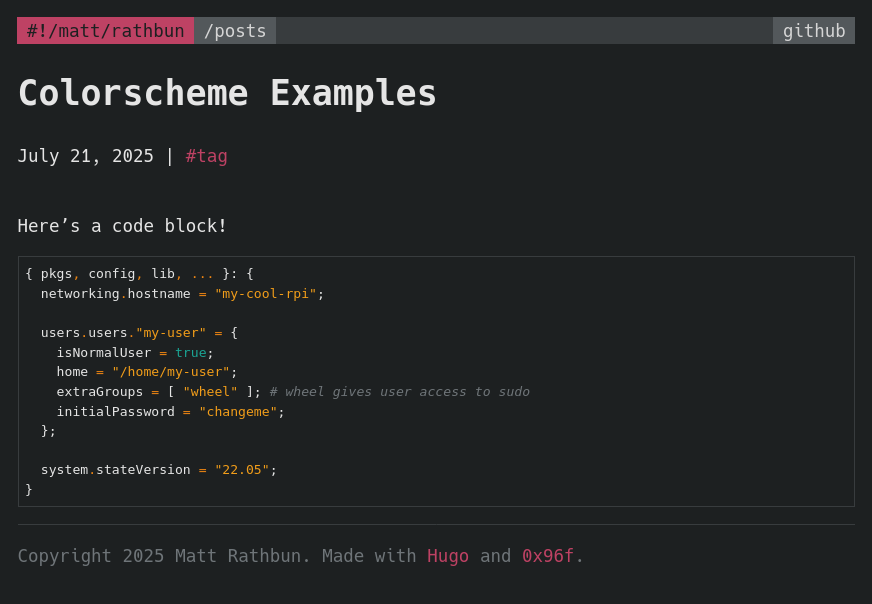
I can switch the site to different base16 themes easily, just like in my dotfiles!
Here it is with gruvbox-dark and a green accent color:
Here’s my old favorite helios with a magenta accent color:
Do I change colorschemes often enough to justify making it work this way? Probably not. But it was fun to make.
Under the hood
In my Hugo theme, I reference a colors.css file but the file is ephemeral. It doesn’t exist when you clone the repository. It’s even gitignored so it can’t be accidentally committed. Nix generates the colors.css file based on a base16 color palette from Basix.
In flake.nix, I initialize a colorsCss variable that contains the file contents that will be put into colors.css:
let
  palette = basix.schemeData.base16."0x96f".palette;

  accent = palette.base09; # orange
  accent-hover = palette.base0E; # magenta
  bg = palette.base00;
  fg = palette.base07;

  colorsCss = /* css */ ''
    :root {
      --base00: ${palette.base00};
      --base01: ${palette.base01};
      --base02: ${palette.base02};
      --base03: ${palette.base03};
      --base04: ${palette.base04};
      --base05: ${palette.base05};
      --base06: ${palette.base06};
      --base07: ${palette.base07};
      --base08: ${palette.base08}; /* red */
      --base09: ${palette.base09}; /* orange */
      --base0A: ${palette.base0A}; /* yellow */
      --base0B: ${palette.base0B}; /* green */
      --base0C: ${palette.base0C}; /* cyan */
      --base0D: ${palette.base0D}; /* blue */
      --base0E: ${palette.base0E}; /* magenta */
      --base0F: ${palette.base0F}; /* brown */

      --main-bg-color: ${bg};
      --main-text-color: ${fg};
      --accent-color: ${accent};
      --accent-hover-color: ${accent-hover};
    }
  '';
in # ...
I have a package/derivation that builds the colors.css file:
packages.colors = pkgs.stdenv.mkDerivation {
  name = "mattbun.github.io/colors";
  src = self;
  buildInputs = buildInputs;

  buildPhase = ''
    cp ${pkgs.writeText "colors.css" colorsCss} colors.css
  '';

  installPhase = "cp colors.css $out";
};
And there’s a another (default) package that builds the whole site, including colors.css, that I use in GitHub Actions:
packages.default = pkgs.stdenv.mkDerivation {
  name = "mattbun.github.io";
  src = self;
  buildInputs = buildInputs;

  buildPhase = ''
    cp ${pkgs.writeText "colors.css" colorsCss} themes/dotfiles/assets/css/colors.css
    ${pkgs.hugo}/bin/hugo
    cp CNAME public/CNAME
  '';

  installPhase = "cp -r public $out";
};
To run the site locally, the develop make target has a dependency on the colors.css file. The colors.css target builds the #colors nix package to generate colors.css:
develop: themes/dotfiles/assets/css/colors.css
	nix develop --command hugo server -D --bind 0.0.0.0

MAKEFLAGS += --check-symlink-times
themes/dotfiles/assets/css/colors.css: flake.nix flake.lock
	nix build .#colors -o ./themes/dotfiles/assets/css/colors.css
--check-symlink-times is necessary to prevent it from always rebuilding colors.css. The -o ./themes/dotfiles/assets/css/colors.css flag instructs nix to symbolic link the built package directly at that path. By default, make will only look at the timestamp of the file that the link points to. In this case, it comes from the nix store which has a timestamp of zero.
Closing thoughts, what am I doing here?
Ok I do have some ideas about what I want to do with the site moving forward. Some general goals:
- Write more short-form posts
- Don’t get caught up in making every post perfect
- Maybe write about other hobbies or my personal life?
We’ll see how it goes!
Or maybe I’ll come back here in a couple years with another major rewrite of the site. At least it’s been fun to build.